Icon of program: StarBurn

StarBurn for Windows

  • Free
  • 3.6
    91
  • 64.6K
  • V15.7
Free Download for Windows

View an ad to download for free

Complete solution for ripping and copying CD, DVD, Blu-Ray and HD-DVD

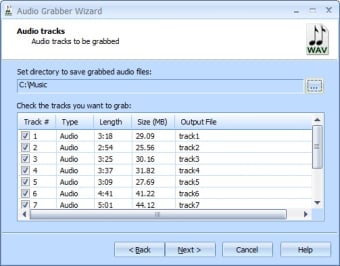
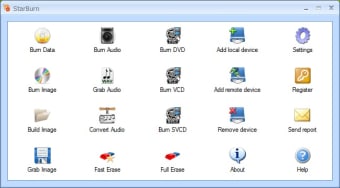
With so many different types of optical storage platforms around at the moment it's easy to get confused about the best software to use to rip or copy your disks. StarBurn is a nice solution because it supports a wide range of different disk formats, and it's also free. With StarBurn you can record data, music, an image of a CD or DVD, extract tracks of audio, generate a disk image and even compress different formats from audio in MP3 or OGG.

Unlock your creativity with Adobe Stock

Get 10 images or 1 video with a free trial

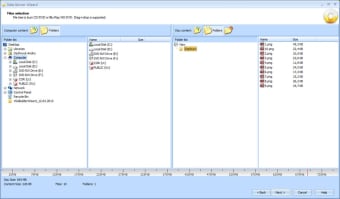
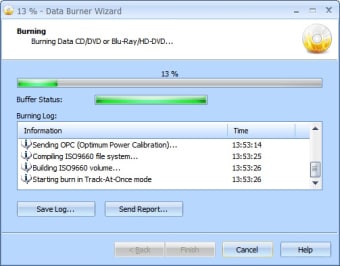
Anyone with even a passing knowledge of Windows XP will be able to pick up and use the program straight away, as its file explorer panel mirrors the OS precisely. Although the actions you'll need are presented in the form of a wizard, meaning that although burning times aren't the quickest around, this is a very simple, free solution for copying any type of disk. This program is also Windows 11 compatible. 

  • Pros

    • Supports all the major disk formats
    • Handy wizard-driven interface
  • Cons

    • Not particularly quick
 0/4

App specs

  • Developer

  • License

    Free

  • Version

    15.7
  • Latest update

  • Platform

    Windows

  • OS

    Windows Vista

  • Language

    English

  • Downloads

    64.6K

    Last month's downloads

    • 52
  • Size

    20.35 MB

Program available in other languages


Icon of program: StarBurn

StarBurn for PC

  • Free
  • 3.6
    91
  • 64.6K
  • V15.7
Free Download for PC

View an ad to download for free


User reviews about StarBurn

3.6

2 reviews

Add review

Main reviews for you

  • Anonymous user

    Waste of disks. Yeah, Starburn is easy to use, just follow the simplistic helps. It works great until you try to burn to dvd and then it always ends with a burn error AFTER ruining the dvd. I lost 3 double layer dvds trying to get it to burn properly. Nope, no go no matter what I tried. Pros: Free Cons: Worth every cent.

  • Anonymous user

    Starburn. Load of old codswallop. You need to be a rocket Scientist to operate this. Could not get any of the functions to work Pros: Nothing seems to work Cons: Its free

More

You may also like

Alternatives to StarBurn

Explore Apps

Latest articles

Laws concerning the use of this software vary from country to country. We do not encourage or condone the use of this program if it is in violation of these laws.
Softonic

Is StarBurn safe?

96/100

Score result: Clean

This file passed a comprehensive security scan using VirusTotal technology. It is safe to download.

  • Virus free
  • Spyware free
  • Malware free
  • Verified by Security Partners

    VirusTotal logo

Scan Info

Last scan
Tuesday, April 23, 2024
Scan provider
VirusTotal · Full report

File Integrity

File
starburn-15-7.exe
SHA256
be6deda9f3f6806a60fa6d3784d4e84a4d42a807d0a0ef1284feb989476834d0
SHA1
c61387c6082c62dbde151d427df109d38acc4083

Softonic security commitment

StarBurn has been thoroughly scanned by our advanced security systems and verified by industry-leading partners. This file comes from the official developer and has passed all our security checks, showing no signs of viruses, malware, or spyware. For more information, visit our Security and Trust Center

Signed in to Softonic as